
API Reference
POST /v1/analyze
Analyze tire and vehicle images to identify tire and vehicle information.
Analyzes tire and vehicle images using advanced AI to identify the vehicle's brand, model, year, trim levels, and tire specifications.
Endpoint
POST https://api.ruedalens.com/v1/analyze
Authentication
Requires a valid API key in the Authorization header.
Authorization: Bearer rdlns_sk_...
Recognition Modes
The API supports two recognition modes, selectable per request via the mode parameter:
| Mode | Images Required | Tire Size Accuracy | Vehicle Model Accuracy | Best For |
|---|---|---|---|---|
single | 1 (tire only) | High | High | Tire identification when vehicle matching is secondary, or simplified UX with a single photo |
dual | 2 (tire + vehicle) | High | Very high | Maximum accuracy when vehicle identification is a priority |
Choosing a mode
Use dual mode when identifying the vehicle model is critical for your use case. Use single mode when the tire data is the primary need and you want a simpler user experience with just one photo.
The response always includes a mode field confirming which mode was used.
Request
Headers
| Header | Value | Required |
|---|---|---|
Authorization | Bearer rdlns_sk_... | Yes |
Content-Type | application/json | Yes |
Body Parameters
| Parameter | Type | Required | Description |
|---|---|---|---|
mode | string | Yes | Recognition mode: "single" or "dual". |
image | string | Conditional | Base64-encoded tire image. Required in single mode. |
tireImage | string | Conditional | Base64-encoded tire image. Required in dual mode. |
carImage | string | Conditional | Base64-encoded vehicle image. Required in dual mode. |
Example Request
curl -X POST https://api.ruedalens.com/v1/analyze \
  -H "Authorization: Bearer rdlns_sk_your_api_key_here" \
  -H "Content-Type: application/json" \
  -d '{
    "mode": "single",
    "image": "/9j/4AAQSkZJRg..."
  }'
Response
Success — 200 OK
{
  "success": true,
  "requestId": "cmlecazi4000111qu590n9v6i",
  "mode": "dual",
  "data": {
    "vehicles": [
      {
        "confidence": 0.98,
        "brand": "Lexus",
        "model": "NX",
        "trims": ["300h", "300"],
        "start_year": 2017,
        "end_year": 2021,
        "current_tire": {
          "tire_brand": "Bridgestone",
          "tire_model": "Dueler H/L 33",
          "width": 225,
          "aspect_ratio": 60,
          "diameter": 18,
          "load_index": "100",
          "speed_index": "H",
          "structure": "R",
          "runflat": null,
          "xl": null,
          "3pmsf": null,
          "tire_size": "225/60R18 100H"
        },
        "oe_front_tire": {
          "width": 225,
          "aspect_ratio": 60,
          "diameter": 18,
          "load_index": "100",
          "speed_index": "H",
          "structure": "R",
          "runflat": false,
          "xl": false,
          "tire_size": "225/60R18 100H"
        },
        "oe_rear_tire": {
          "width": 225,
          "aspect_ratio": 60,
          "diameter": 18,
          "load_index": "100",
          "speed_index": "H",
          "structure": "R",
          "runflat": false,
          "xl": false,
          "tire_size": "225/60R18 100H"
        },
        "pressure_front": 2.2,
        "pressure_rear": 2.2
      }
    ]
  },
  "metrics": {
    "executionTimeMs": 10364
  },
  "timestamp": "2026-02-08T22:54:03.962Z"
}
Response Fields
| Field | Type | Description |
|---|---|---|
success | boolean | Whether the request was successful |
requestId | string | Unique request identifier for tracking and debugging |
mode | string | Recognition mode used for this request ("single" or "dual") |
data.vehicles | array | Array of identified vehicle matches (ordered by confidence) |
data.vehicles[].confidence | number | AI confidence score (0.0 to 1.0) |
data.vehicles[].brand | string | Vehicle manufacturer |
data.vehicles[].model | string | Base vehicle model |
data.vehicles[].trims | string[] | Available trim levels for this model |
data.vehicles[].start_year | number | First production year for this generation |
data.vehicles[].end_year | number | Last production year for this generation |
data.vehicles[].current_tire.tire_brand | string|null | Tire manufacturer read from the sidewall (e.g., "Michelin"). Null if not readable. |
data.vehicles[].current_tire.tire_model | string|null | Tire product line read from the sidewall (e.g., "Pilot Sport 4"). Null if not readable. |
data.vehicles[].current_tire | object | Tire specification found on the tire sidewall |
data.vehicles[].oe_front_tire | object | Original equipment front tire specification |
data.vehicles[].oe_rear_tire | object | Original equipment rear tire specification |
data.vehicles[].pressure_front | number | Recommended front tire pressure (bar) |
data.vehicles[].pressure_rear | number | Recommended rear tire pressure (bar) |
metrics.executionTimeMs | number | Total processing time in milliseconds |
timestamp | string | ISO 8601 timestamp of the response |
Tire Object Structure
Each tire object (current_tire, oe_front_tire, oe_rear_tire) contains the fields below. The tire_brand and tire_model fields are exclusive to current_tire and are not present on OE tire objects.
| Field | Type | Description |
|---|---|---|
tire_brand | string|null | current_tire only. Tire manufacturer read from the sidewall (e.g., "Michelin", "Continental"). Null if not readable. |
tire_model | string|null | current_tire only. Tire product line read from the sidewall (e.g., "Pilot Sport 4", "PremiumContact 6"). Null if not readable. |
width | number | Tire width in millimeters (e.g., 225) |
aspect_ratio | number | Sidewall height as percentage of width (e.g., 60) |
diameter | number | Wheel diameter in inches (e.g., 18) |
load_index | string|null | Load capacity rating (e.g., "100"). null on current_tire when not readable from the sidewall. |
speed_index | string|null | Maximum speed rating (e.g., "H"). null on current_tire when not readable from the sidewall. |
structure | string | Tire construction type (typically "R" for radial) |
runflat | boolean|null | Whether tire is run-flat capable |
xl | boolean|null | Whether tire has extra load capacity |
3pmsf | boolean|null | Whether tire has Three-Peak Mountain Snowflake (3PMSF) winter certification |
tire_size | string | Complete formatted tire size string following industry standards (e.g., "225/60R18 100H" or "225/60R18 100H XL") |
Formatted Tire Size
The tire_size field provides a complete, industry-standard tire designation string that combines all tire specifications. Use this for display purposes, tire searches, or compatibility checks. The format includes optional indicators like XL (extra load), RFT (run-flat), or ❄ (3PMSF winter certification) when applicable.
Understanding the Tire Fields
The response includes three tire specifications that serve different purposes:
current_tire: The tire specification read from the sidewall image via OCR. This is what's actually mounted on the vehicle. May containnullvalues if text isn't legible.oe_front_tire: The original equipment (OE) tire specification for the front axle from the manufacturer's database. This is what came from the factory.oe_rear_tire: The original equipment tire specification for the rear axle. For most vehicles, this matches the front tire unless the vehicle has a staggered setup.
Current vs. OE tires
The current tire may differ from OE specifications if the owner has changed tire sizes. Use current_tire to know what's on the vehicle now, and oe_front_tire/oe_rear_tire to suggest compatible replacements.
Tire Brand & Model
The tire_brand and tire_model fields exist only on current_tire and are populated when the text is clearly readable from the tire sidewall. They are not present at all on oe_front_tire and oe_rear_tire (OE data comes from the vehicle database, which doesn't include tire brand/model). If the brand or model text isn't legible, the field returns null rather than a guess — accuracy is prioritized over completeness.
Understanding Confidence Scores
The confidence field (0.0 to 1.0) indicates how certain the AI is about the vehicle identification:
| Confidence Range | Interpretation | Recommendation |
|---|---|---|
| 0.95 - 1.0 | Very high confidence | Safe to auto-process |
| 0.85 - 0.94 | High confidence | Generally reliable, minor verification recommended |
| 0.70 - 0.84 | Moderate confidence | Manual verification recommended |
| < 0.70 | Low confidence | Requires manual review |
Low confidence results
When confidence is below 0.70, we recommend presenting the results to users for manual verification. This typically happens with unclear images, unusual vehicle models, or ambiguous tire markings.
Understanding Trims Array
The trims array is ordered by likelihood, with the most probable trim first:
"trims": ["300h", "300", "200t"]
This means the vehicle is most likely a "300h" trim, but could also be a "300" or "200t". Use the first trim for the most likely match.
Error Responses
400 Bad Request
Every error response uses the same envelope: success, an error object (code, message, retryable, and details on validation errors), and a timestamp.
{
  "success": false,
  "error": {
    "code": "INVALID_IMAGE",
    "message": "Invalid request body",
    "retryable": false,
    "details": [{ "path": ["image"], "message": "Required" }]
  },
  "timestamp": "2026-02-08T22:54:03.962Z"
}
422 Unreadable Image
Returned when the image is valid but its content doesn't allow reliable tire size extraction (e.g., not a tire, tread-only view, unreadable sidewall markings).
{
  "success": false,
  "requestId": "cmlecazi4000111qu590n9v6i",
  "error": {
    "code": "UNREADABLE_IMAGE",
    "message": "Only the tire tread is visible. The sidewall markings where the tire size is printed cannot be read.",
    "retryable": false
  },
  "timestamp": "2026-02-08T22:54:03.962Z"
}
See UNREADABLE_IMAGE for details.
401 Unauthorized
{
  "success": false,
  "error": {
    "code": "INVALID_API_KEY",
    "message": "Invalid or expired API key.",
    "retryable": false
  },
  "timestamp": "2026-02-08T22:54:03.962Z"
}
429 Too Many Requests
Returned as RATE_LIMIT_EXCEEDED for burst rate limits, or QUOTA_EXCEEDED for monthly quota exhaustion (Sandbox plan):
{
  "success": false,
  "error": {
    "code": "QUOTA_EXCEEDED",
    "message": "Monthly quota exceeded",
    "retryable": false
  },
  "timestamp": "2026-02-08T22:54:03.962Z"
}
Image Requirements
| Property | Requirement |
|---|---|
| Format | JPEG or PNG |
| Encoding | Base64-encoded string (without data URL prefix) |
| Max size | 10 MB per image |
| Recommended resolution | 1920x1080 or higher (images are automatically optimized) |
Image Quality Guidelines
The quality of your input images directly affects accuracy. Follow these guidelines for best results:
Tire Image Best Practices
- Lighting: Ensure even lighting with no harsh shadows on the sidewall text
- Angle: Photograph perpendicular to the wheel (straight-on, not at an angle)
- Focus: Make sure all text on the sidewall is sharp and legible
- Coverage: Capture the entire tire size marking (e.g., "225/60 R18 100H")
- Avoid: Blurry images, extreme angles, heavy shadows, or obstructed text
Vehicle Image Best Practices
- Framing: Include the full vehicle in the shot (front three-quarter, side, or rear angles work best)
- Distance: Stand 10-15 feet away for optimal framing
- Clarity: Ensure the vehicle's body style and design elements are clearly visible
- Avoid: Extreme close-ups, partial vehicle shots, or heavily cropped images
Resolution vs. file size
While higher resolution improves accuracy, images over ~2MP provide diminishing returns. We recommend 1920x1080 as a good balance between quality and upload speed. Images are automatically downscaled to 1500px during processing.
Visual Examples
Below are real-world examples demonstrating proper image capture technique for optimal results.
Example 1: Standard Conditions
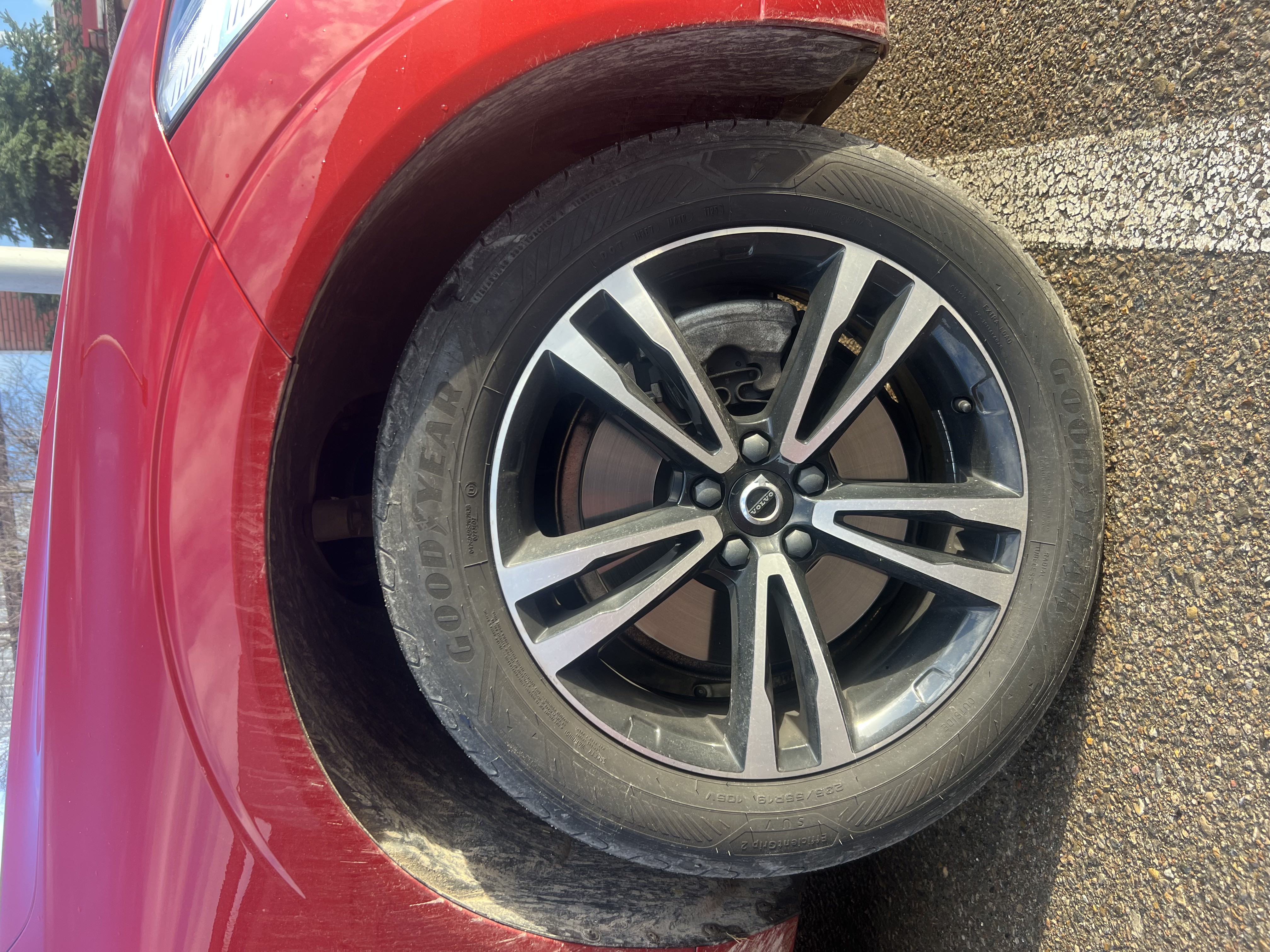
Tire image: Perpendicular angle, even lighting, all sidewall text legible

Vehicle image: Full view with clear body lines and design elements
Example 2: Challenging Conditions
Our system maintains high accuracy even with less-than-perfect conditions:
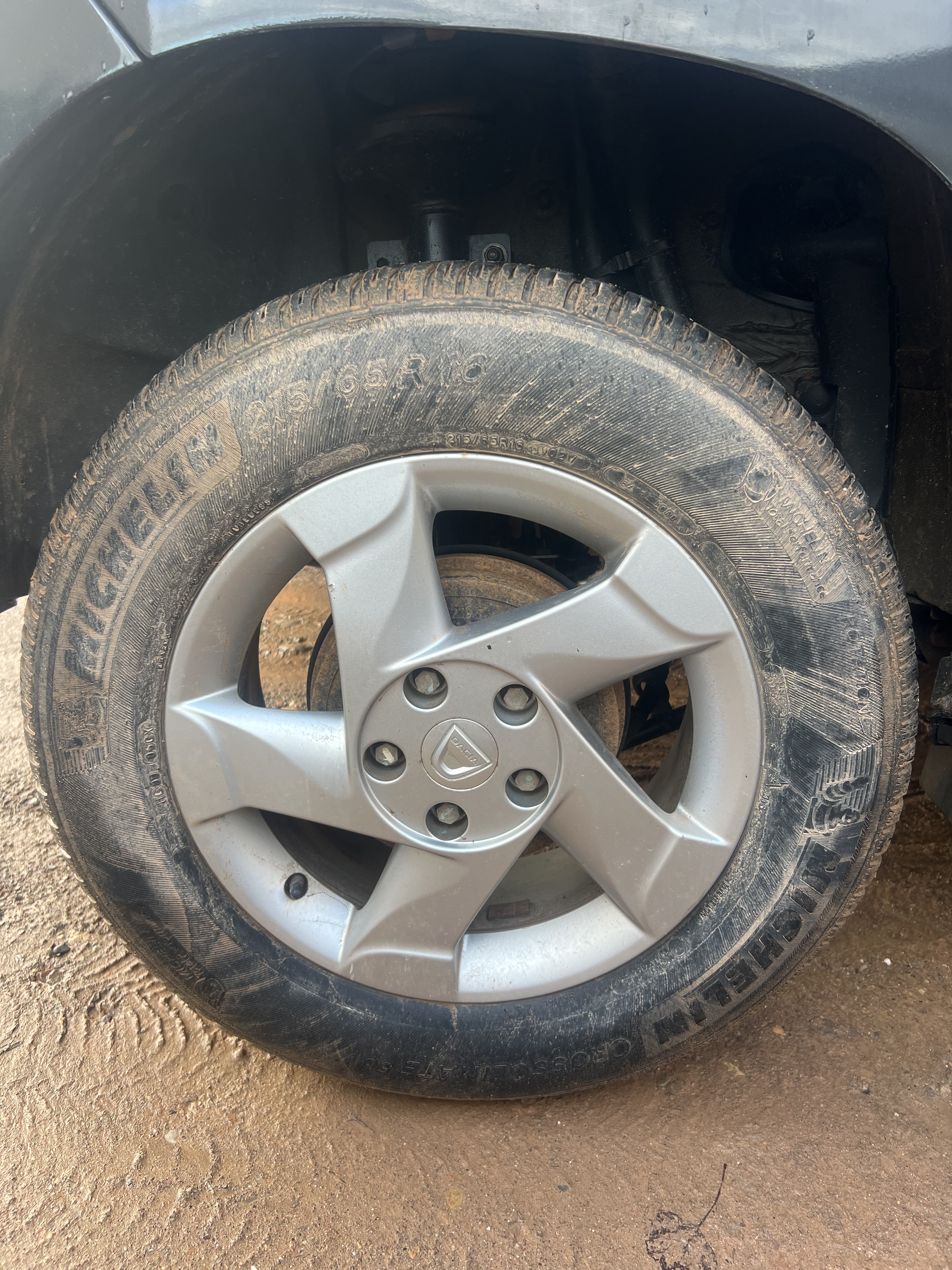
Muddy tire: Despite dirt and poor conditions, the system successfully extracts tire specifications
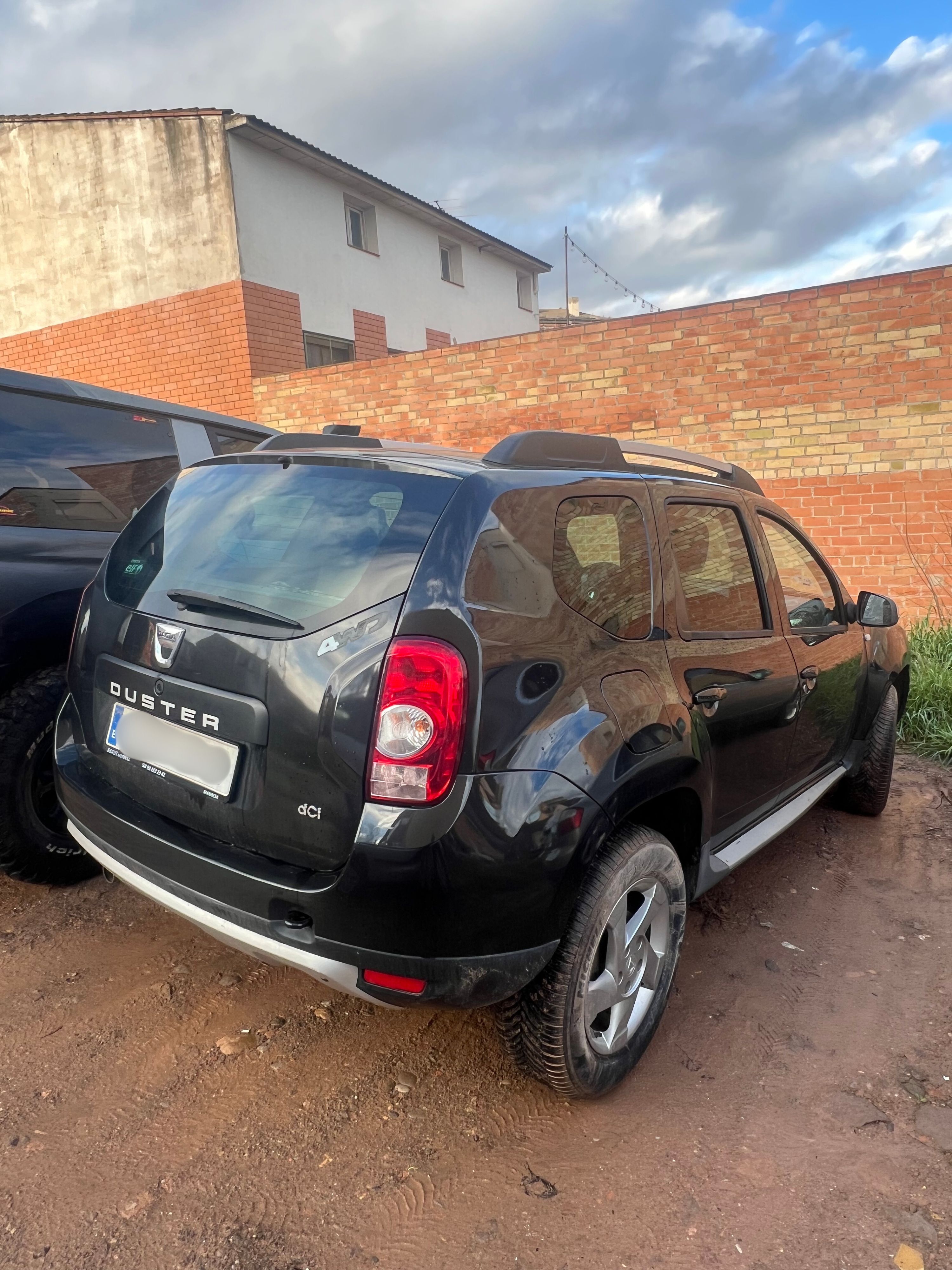
Vehicle image: Rugged conditions demonstrate robust recognition capabilities
Advanced AI capabilities
Our recognition engine is trained to handle real-world conditions including dirt, mud, wear, and suboptimal lighting. While clean, well-lit images provide the best results, the system maintains high accuracy across diverse scenarios.
Performance & Billing
Processing Time
Typical end-to-end response time: 7-15 seconds
This includes:
- Network time: Image upload to our servers (~1-3s depending on connection and image size)
- Server processing: AI analysis and enrichment (~7-10s)
- Network time: Response download (<1s)
Factors affecting processing time:
| Factor | Impact | Optimization |
|---|---|---|
| Image size | Larger files = longer upload | Resize to 1920x1080 before encoding |
| Image resolution | Minimal (auto-downscaled) | No need to exceed 2MP |
| Network latency | Variable by location | Use CDN or edge locations when possible |
| Server load | Minimal (auto-scaling) | No action needed |
The executionTimeMs metric:
- Reflects server-side processing time only (excludes network time)
- Useful for monitoring API performance trends
- Typically ranges from 10,000ms to 20,000ms
Optimization tip
To minimize total request time, compress and resize images on your end before base64 encoding. A 1920x1080 JPEG at 85% quality provides excellent results while keeping payload size under 500KB.
Quota & Billing
- Each request counts toward your monthly quota, regardless of success or failure
- Multiple vehicle matches may be returned when confidence is distributed across similar models
- The API processes both images simultaneously for maximum accuracy