------------------------------------------------------------------------------------------------------------------------ title: "Introduction" description: "Welcome to the Rueda Lens API documentation. Learn how to integrate AI-powered tire and vehicle identification into your application." section: "guide" last_updated: "2026-02-09T18:49:45.154Z" source: "https://docs.ruedalens.com/en" ------------------------------------------------------------------------------------------------------------------------ # Introduction Rueda Lens is a B2B API service that provides **AI-powered tire and vehicle identification** from tire images. Built with industry-leading technologies for maximum performance, reliability, and scalability. Get started with our [Getting Started Guide](/getting-started) to make your first API call in minutes. ## Key Features - **AI-Powered Recognition** — Advanced AI analyzes tire and vehicle images for accurate identification - **Comprehensive Data** — Returns vehicle brand, model, trim levels, year range, tire specifications, and pressure recommendations - **Fast Processing** — Typically 7–15 seconds per request - **RESTful API** — Simple, well-documented JSON endpoints - **Secure Authentication** — API key-based authentication with encrypted storage - **Usage Tracking** — Real-time quota monitoring and email notifications - **Flexible Billing** — Subscription plans with overage support for growing businesses ## Use Cases | Industry | Application | |----------|-------------| | **E-commerce** | Identify compatible vehicles from customer tire photos | | **Automotive Services** | Streamline vehicle identification workflows | | **Insurance** | Automate vehicle verification processes | | **Inventory Management** | Quickly catalog tire and vehicle data | ## Base URL ``` https://api.ruedalens.com ``` ## Next Steps ------------------------------------------------------------------------------------------------------------------------ title: "LLM Full" description: "Access all documentation in plain text format for LLM consumption." section: "resources" last_updated: "2026-02-09T18:49:45.154Z" source: "https://docs.ruedalens.com/en/resources/llms-full" ------------------------------------------------------------------------------------------------------------------------ # LLM Full This page provides a plain text version of the entire Rueda Lens documentation, optimized for consumption by Large Language Models (LLMs) like ChatGPT, Claude, and others. ## What is LLM Full? LLM Full is a consolidated plain text file containing all documentation pages in a format that's easy for AI assistants to process. This allows you to: - Feed the entire documentation to your preferred LLM for context-aware assistance - Get accurate answers about Rueda Lens without the AI hallucinating information - Work with AI assistants that have full knowledge of all API features and best practices ## How to Use ### Option 1: Direct Access Access the plain text documentation directly at: - **English**: [https://docs.ruedalens.com/en/llms-full.txt](https://docs.ruedalens.com/en/llms-full.txt) - **Spanish**: [https://docs.ruedalens.com/es/llms-full.txt](https://docs.ruedalens.com/es/llms-full.txt) ### Option 2: With ChatGPT, Claude or other AI assistants 1. Copy the URL above 2. In the chat, paste: "Please read and analyze the documentation at [URL]" 3. Ask your questions about the Rueda Lens API ## Format Specification The plain text file follows this structure: ```txt -------------------------------------------------------------------------------- title: "Page Title" description: "Page description" section: "guide | api-reference | resources" last_updated: "2026-02-09T12:00:00.000Z" source: "https://docs.ruedalens.com/en/page-slug" -------------------------------------------------------------------------------- # Page Title [Full markdown content of the page] ``` Each page is separated by horizontal rules (`---`) and includes metadata that helps LLMs understand the context and source of each section. ## Best Practices When working with LLMs using this documentation: 1. **Be Specific**: Ask precise questions referencing specific API endpoints or features 2. **Verify Code**: Always test code examples provided by the AI in a development environment 3. **Check for Updates**: The documentation is regularly updated, so verify information for the latest changes 4. **Use Quotes**: Reference specific parts of the documentation when asking follow-up questions ## Example Prompts Here are some effective ways to use the LLM Full documentation: **Setup**: ``` I'm providing the complete Rueda Lens API documentation. Please read it carefully. [Paste content from llms-full.txt] Ready to answer my questions? ``` **Getting Started**: ``` Based on the Rueda Lens documentation, show me how to: 1. Authenticate with the API 2. Make my first vehicle recognition request 3. Handle rate limiting ``` **Troubleshooting**: ``` I'm getting a 401 error when calling /v1/analyze. Based on the docs, what are the possible causes and how do I fix them? ``` ## Feedback Found an issue with the LLM Full format or have suggestions for improvement? Please [contact our support team](mailto:support@ruedalens.com) or submit an issue on our GitHub repository. ------------------------------------------------------------------------------------------------------------------------ title: "POST /v1/analyze" description: "Analyze tire and vehicle images to identify tire and vehicle information." section: "api-reference" last_updated: "2026-02-09T18:49:45.154Z" source: "https://docs.ruedalens.com/en/api-reference/analyze" ------------------------------------------------------------------------------------------------------------------------ # POST /v1/analyze Analyzes tire and vehicle images using advanced AI to identify the vehicle's brand, model, year, trim levels, and tire specifications. ## Endpoint ``` POST https://api.ruedalens.com/v1/analyze ``` ## Authentication Requires a valid API key in the `Authorization` header. ``` Authorization: Bearer rdlns_sk_... ``` ## Request ### Headers | Header | Value | Required | |--------|-------|----------| | `Authorization` | `Bearer rdlns_sk_...` | Yes | | `Content-Type` | `application/json` | Yes | ### Body Parameters | Parameter | Type | Required | Description | |-----------|------|----------|-------------| | `tireImage` | `string` | Yes | Base64-encoded tire image | | `carImage` | `string` | Yes | Base64-encoded vehicle image | ### Example Request ```bash curl -X POST https://api.ruedalens.com/v1/analyze \ -H "Authorization: Bearer rdlns_sk_your_api_key_here" \ -H "Content-Type: application/json" \ -d '{ "tireImage": "/9j/4AAQSkZJRg...", "carImage": "/9j/4AAQSkZJRg..." }' ``` ## Response ### Success — `200 OK` ```json { "success": true, "requestId": "cmlecazi4000111qu590n9v6i", "data": { "vehicles": [ { "confidence": 0.98, "brand": "Lexus", "model": "NX", "trims": ["300h", "300"], "start_year": 2017, "end_year": 2021, "current_tire": { "width": 225, "aspect_ratio": 60, "diameter": 18, "load_index": "100", "speed_index": "H", "structure": "R", "runflat": null, "xl": null }, "oe_front_tire": { "width": 225, "aspect_ratio": 60, "diameter": 18, "load_index": "100", "speed_index": "H", "structure": "R", "runflat": false, "xl": false }, "oe_rear_tire": { "width": 225, "aspect_ratio": 60, "diameter": 18, "load_index": "100", "speed_index": "H", "structure": "R", "runflat": false, "xl": false }, "pressure_front": 2.2, "pressure_rear": 2.2 } ] }, "metrics": { "executionTimeMs": 10364 }, "timestamp": "2026-02-08T22:54:03.962Z" } ``` ### Response Fields | Field | Type | Description | |-------|------|-------------| | `success` | `boolean` | Whether the request was successful | | `requestId` | `string` | Unique request identifier for tracking and debugging | | `data.vehicles` | `array` | Array of identified vehicle matches (ordered by confidence) | | `data.vehicles[].confidence` | `number` | AI confidence score (0.0 to 1.0) | | `data.vehicles[].brand` | `string` | Vehicle manufacturer | | `data.vehicles[].model` | `string` | Base vehicle model | | `data.vehicles[].trims` | `string[]` | Available trim levels for this model | | `data.vehicles[].start_year` | `number` | First production year for this generation | | `data.vehicles[].end_year` | `number` | Last production year for this generation | | `data.vehicles[].current_tire` | `object` | Tire specification found on the tire sidewall | | `data.vehicles[].oe_front_tire` | `object` | Original equipment front tire specification | | `data.vehicles[].oe_rear_tire` | `object` | Original equipment rear tire specification | | `data.vehicles[].pressure_front` | `number` | Recommended front tire pressure (bar) | | `data.vehicles[].pressure_rear` | `number` | Recommended rear tire pressure (bar) | | `metrics.executionTimeMs` | `number` | Total processing time in milliseconds | | `timestamp` | `string` | ISO 8601 timestamp of the response | ### Tire Object Structure Each tire object (current_tire, oe_front_tire, oe_rear_tire) contains: | Field | Type | Description | |-------|------|-------------| | `width` | `number` | Tire width in millimeters (e.g., 225) | | `aspect_ratio` | `number` | Sidewall height as percentage of width (e.g., 60) | | `diameter` | `number` | Wheel diameter in inches (e.g., 18) | | `load_index` | `string` | Load capacity rating (e.g., "100") | | `speed_index` | `string` | Maximum speed rating (e.g., "H") | | `structure` | `string` | Tire construction type (typically "R" for radial) | | `runflat` | `boolean\|null` | Whether tire is run-flat capable | | `xl` | `boolean\|null` | Whether tire has extra load capacity | ### Understanding the Tire Fields The response includes three tire specifications that serve different purposes: - **`current_tire`**: The tire specification read from the sidewall image via OCR. This is what's actually mounted on the vehicle. May contain `null` values if text isn't legible. - **`oe_front_tire`**: The original equipment (OE) tire specification for the front axle from the manufacturer's database. This is what came from the factory. - **`oe_rear_tire`**: The original equipment tire specification for the rear axle. For most vehicles, this matches the front tire unless the vehicle has a staggered setup. The current tire may differ from OE specifications if the owner has changed tire sizes. Use `current_tire` to know what's on the vehicle now, and `oe_front_tire`/`oe_rear_tire` to suggest compatible replacements. ### Understanding Confidence Scores The `confidence` field (0.0 to 1.0) indicates how certain the AI is about the vehicle identification: | Confidence Range | Interpretation | Recommendation | |-----------------|----------------|----------------| | **0.95 - 1.0** | Very high confidence | Safe to auto-process | | **0.85 - 0.94** | High confidence | Generally reliable, minor verification recommended | | **0.70 - 0.84** | Moderate confidence | Manual verification recommended | | **< 0.70** | Low confidence | Requires manual review | When confidence is below 0.70, we recommend presenting the results to users for manual verification. This typically happens with unclear images, unusual vehicle models, or ambiguous tire markings. ### Understanding Trims Array The `trims` array is ordered by likelihood, with the most probable trim first: ```json "trims": ["300h", "300", "200t"] ``` This means the vehicle is most likely a "300h" trim, but could also be a "300" or "200t". Use the first trim for the most likely match. ## Error Responses ### `400` Bad Request ```json { "success": false, "error": { "code": "INVALID_IMAGE", "message": "Invalid request body", "details": { "field": "tireImage", "issue": "Must be a valid base64-encoded image" } } } ``` ### `401` Unauthorized ```json { "success": false, "error": { "code": "INVALID_API_KEY", "message": "Invalid API key" } } ``` ### `429` Too Many Requests Returned as `RATE_LIMIT_EXCEEDED` for burst rate limits, or `QUOTA_EXCEEDED` for monthly quota exhaustion (Sandbox plan): ```json { "success": false, "error": { "code": "QUOTA_EXCEEDED", "message": "Monthly quota exceeded" } } ``` ## Image Requirements | Property | Requirement | |----------|-------------| | **Format** | JPEG or PNG | | **Encoding** | Base64-encoded string (without data URL prefix) | | **Max size** | 10 MB per image | | **Recommended resolution** | 1920x1080 or higher (images are automatically optimized) | ### Image Quality Guidelines The quality of your input images directly affects accuracy. Follow these guidelines for best results: #### Tire Image Best Practices - **Lighting**: Ensure even lighting with no harsh shadows on the sidewall text - **Angle**: Photograph perpendicular to the wheel (straight-on, not at an angle) - **Focus**: Make sure all text on the sidewall is sharp and legible - **Coverage**: Capture the entire tire size marking (e.g., "225/60 R18 100H") - **Avoid**: Blurry images, extreme angles, heavy shadows, or obstructed text #### Vehicle Image Best Practices - **Framing**: Include the full vehicle in the shot (front three-quarter, side, or rear angles work best) - **Distance**: Stand 10-15 feet away for optimal framing - **Clarity**: Ensure the vehicle's body style and design elements are clearly visible - **Avoid**: Extreme close-ups, partial vehicle shots, or heavily cropped images While higher resolution improves accuracy, images over ~2MP provide diminishing returns. We recommend 1920x1080 as a good balance between quality and upload speed. Images are automatically downscaled to 1500px during processing. ### Visual Examples Below are real-world examples demonstrating proper image capture technique for optimal results. #### Example 1: Standard Conditions
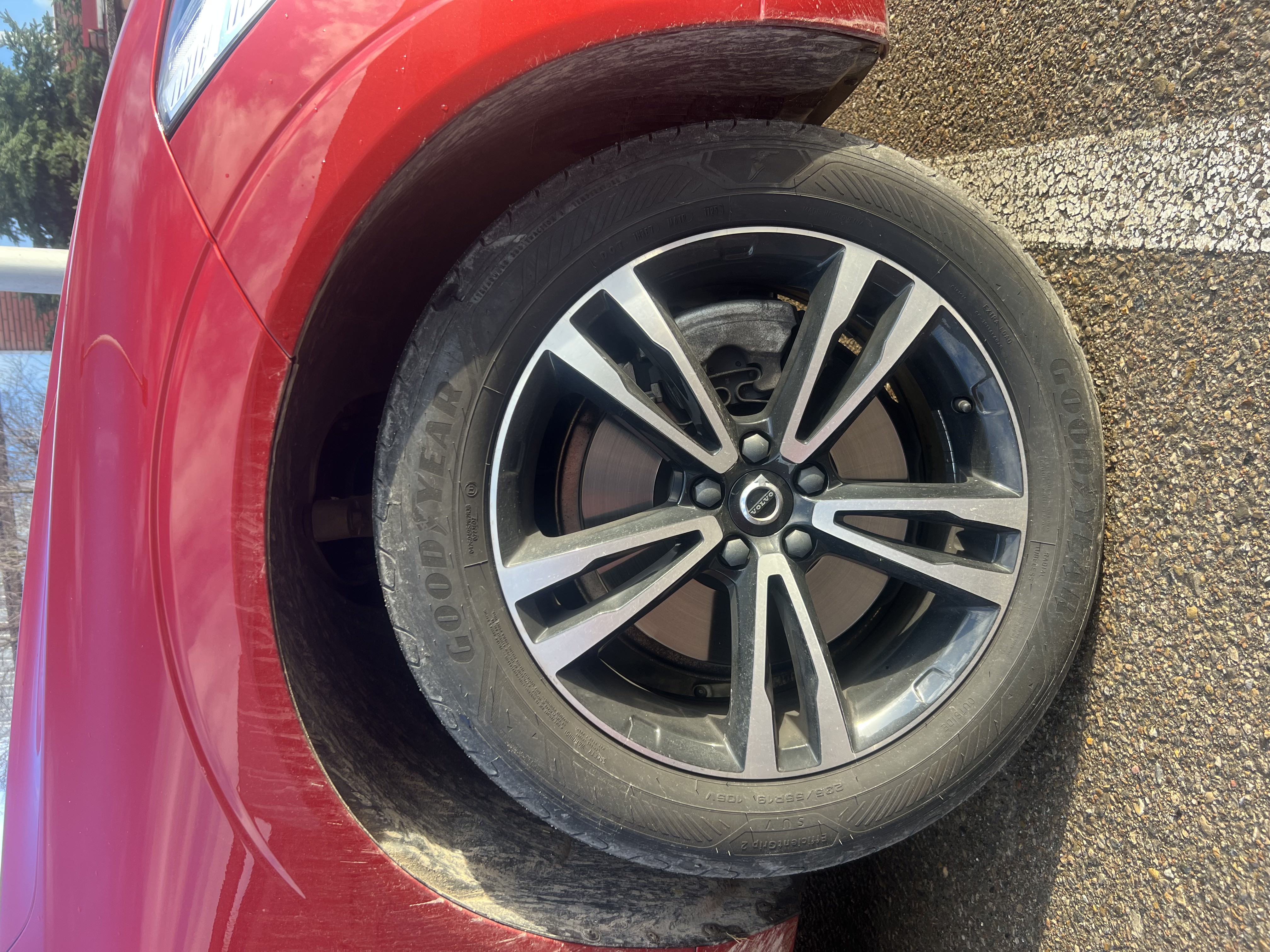
Clean tire example - sidewall text clearly visible

Tire image: Perpendicular angle, even lighting, all sidewall text legible
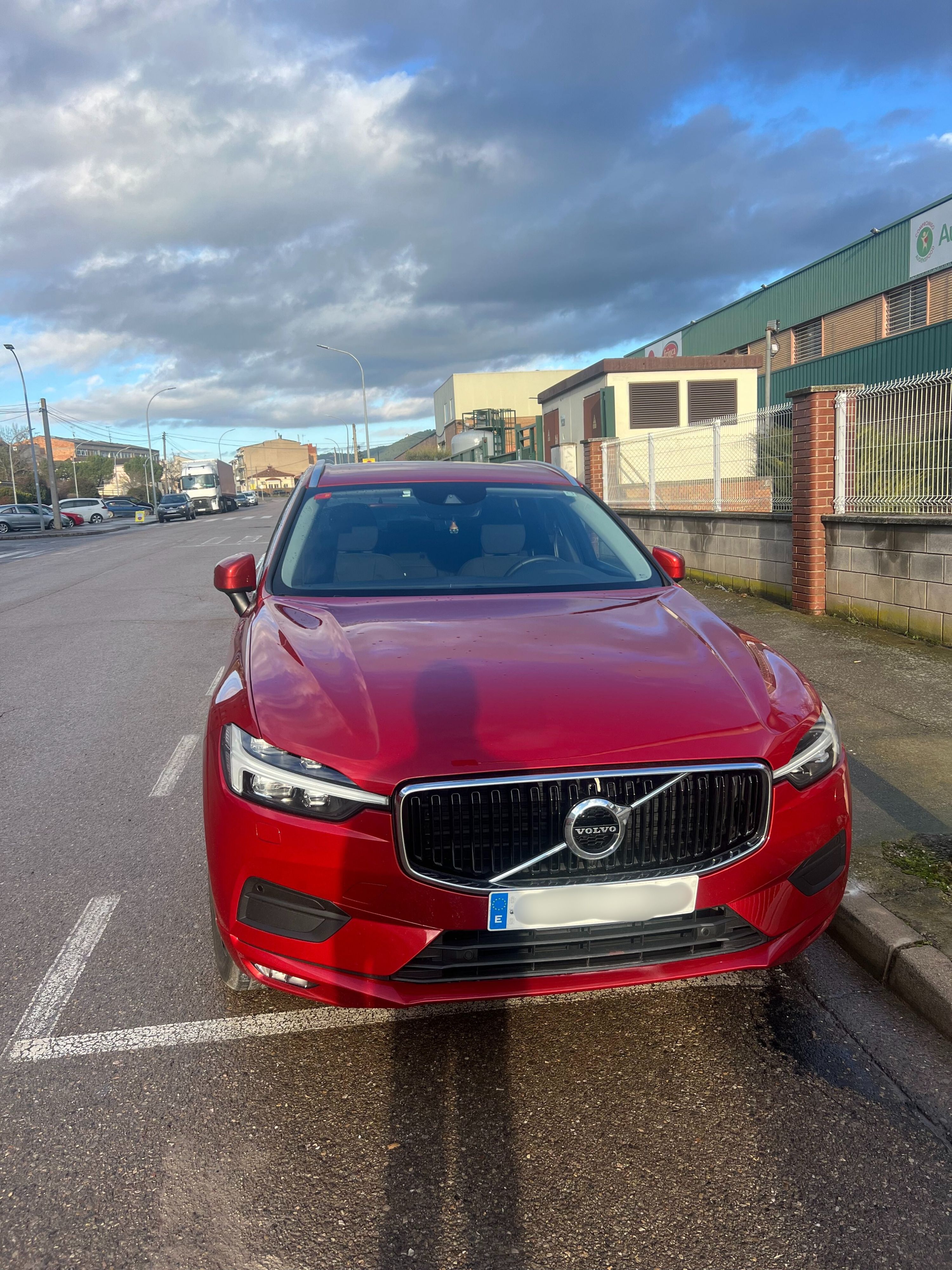
Vehicle example - clear three-quarter view

Vehicle image: Full view with clear body lines and design elements
#### Example 2: Challenging Conditions Our system maintains high accuracy even with less-than-perfect conditions:
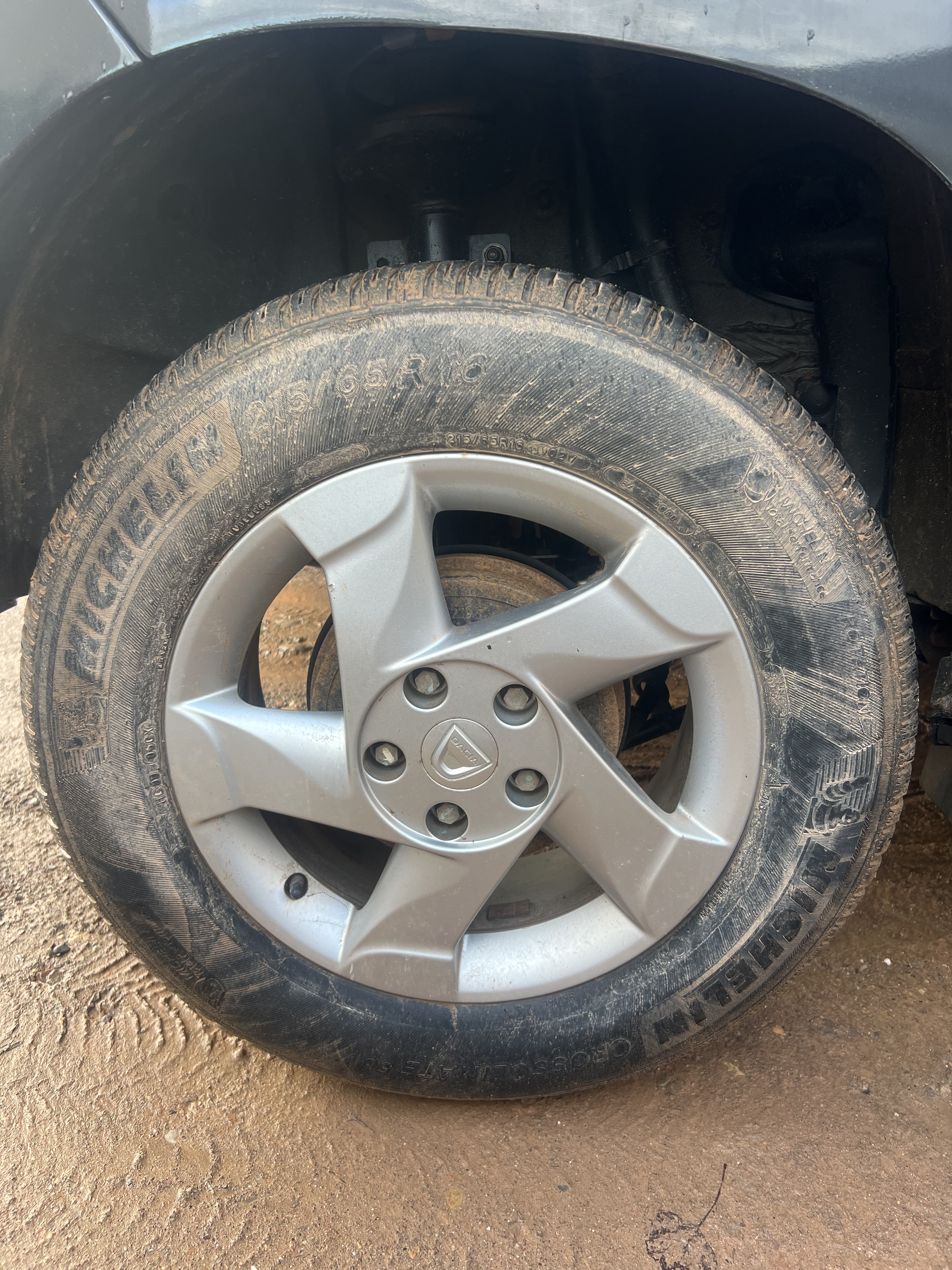
Muddy tire example - system handles difficult conditions

Muddy tire: Despite dirt and poor conditions, the system successfully extracts tire specifications
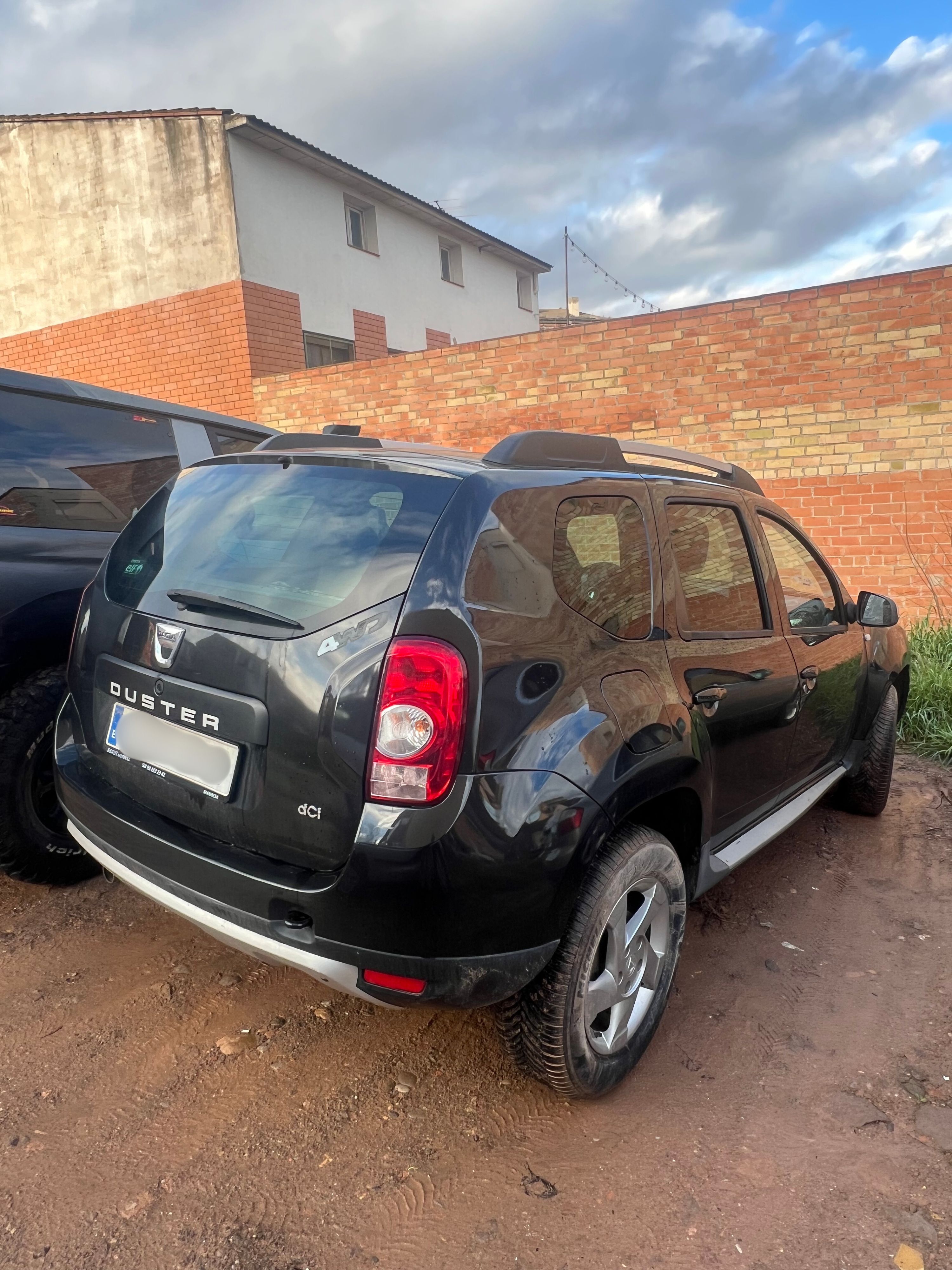
Vehicle in challenging conditions

Vehicle image: Rugged conditions demonstrate robust recognition capabilities

Our recognition engine is trained to handle real-world conditions including dirt, mud, wear, and suboptimal lighting. While clean, well-lit images provide the best results, the system maintains high accuracy across diverse scenarios. ## Performance & Billing ### Processing Time **Typical end-to-end response time: 7-15 seconds** This includes: - **Network time**: Image upload to our servers (~1-3s depending on connection and image size) - **Server processing**: AI analysis and enrichment (~7-10s) - **Network time**: Response download (<1s) **Factors affecting processing time:** | Factor | Impact | Optimization | |--------|--------|-------------| | Image size | Larger files = longer upload | Resize to 1920x1080 before encoding | | Image resolution | Minimal (auto-downscaled) | No need to exceed 2MP | | Network latency | Variable by location | Use CDN or edge locations when possible | | Server load | Minimal (auto-scaling) | No action needed | **The `executionTimeMs` metric:** - Reflects **server-side processing time only** (excludes network time) - Useful for monitoring API performance trends - Typically ranges from 7,000ms to 12,000ms To minimize total request time, compress and resize images on your end before base64 encoding. A 1920x1080 JPEG at 85% quality provides excellent results while keeping payload size under 500KB. ### Quota & Billing - Each request counts toward your monthly quota, regardless of success or failure - Multiple vehicle matches may be returned when confidence is distributed across similar models - The API processes both images simultaneously for maximum accuracy ------------------------------------------------------------------------------------------------------------------------ title: "GET /v1/health" description: "Check the health status of the Rueda Lens API." section: "api-reference" last_updated: "2026-02-09T18:49:45.154Z" source: "https://docs.ruedalens.com/en/api-reference/health" ------------------------------------------------------------------------------------------------------------------------ # GET /v1/health Returns the current health status of the API. This endpoint performs lightweight checks to verify the API is operational. ## Endpoint ``` GET https://api.ruedalens.com/v1/health ``` ## Authentication **None required.** This is a public endpoint. ## Request ```bash curl https://api.ruedalens.com/v1/health ``` ## Response ### Healthy — `200 OK` ```json { "status": "healthy", "version": "1.0.0", "timestamp": "2026-02-08T12:00:00.000Z" } ``` ### Unhealthy — `503 Service Unavailable` ```json { "status": "unhealthy", "version": "1.0.0", "timestamp": "2026-02-08T12:00:00.000Z" } ``` ### Response Fields | Field | Type | Description | |-------|------|-------------| | `status` | `string` | Either `"healthy"` or `"unhealthy"` | | `version` | `string` | Current API version | | `timestamp` | `string` | ISO 8601 timestamp of the health check | ## Use Cases ### Monitoring ```bash # Check health status every 60 seconds */1 * * * * curl -sf https://api.ruedalens.com/v1/health || echo "API is down" ``` ### Pre-flight Check ```javascript async function isApiAvailable() { try { const res = await fetch('https://api.ruedalens.com/v1/health'); const data = await res.json(); return res.ok && data.status === 'healthy'; } catch (error) { return false; } } ``` ## Notes - This endpoint does **not** consume your API quota - Typical response time: < 500ms - Returns `200 OK` when all systems are operational - Returns `503 Service Unavailable` when critical dependencies are down ------------------------------------------------------------------------------------------------------------------------ title: "Getting Started" description: "Make your first API call to Rueda Lens in minutes." section: "guide" last_updated: "2026-02-09T18:49:45.154Z" source: "https://docs.ruedalens.com/en/getting-started" ------------------------------------------------------------------------------------------------------------------------ # Getting Started This guide walks you through making your first API call to Rueda Lens. ### Create an Account 1. Visit [dashboard.ruedalens.com](https://dashboard.ruedalens.com) 2. Sign up with your email address 3. Verify your email via the OTP code sent to your inbox ### Generate an API Key 1. Navigate to the **API Keys** page in your dashboard 2. Click **Create New Key** 3. Give your key a descriptive name (e.g., "Production", "Testing") 4. Copy and securely store your API key — it starts with `rdlns_sk_` API keys are only shown once during creation. Store them securely. ### Make Your First Request ```bash curl -X POST https://api.ruedalens.com/v1/analyze \ -H "Authorization: Bearer rdlns_sk_your_api_key_here" \ -H "Content-Type: application/json" \ -d '{ "tireImage": "/9j/4AAQSkZJRg...", "carImage": "/9j/4AAQSkZJRg..." }' ``` ```javascript const response = await fetch('https://api.ruedalens.com/v1/analyze', { method: 'POST', headers: { 'Authorization': 'Bearer rdlns_sk_your_api_key_here', 'Content-Type': 'application/json', }, body: JSON.stringify({ tireImage: '/9j/4AAQSkZJRg...', carImage: '/9j/4AAQSkZJRg...', }), }); const result = await response.json(); console.log(result); ``` ```python import requests response = requests.post( 'https://api.ruedalens.com/v1/analyze', headers={ 'Authorization': 'Bearer rdlns_sk_your_api_key_here', 'Content-Type': 'application/json', }, json={ 'tireImage': '/9j/4AAQSkZJRg...', 'carImage': '/9j/4AAQSkZJRg...', } ) result = response.json() print(result) ``` ### Understand the Response A successful response looks like this: ```json { "success": true, "requestId": "cmlecazi4000111qu590n9v6i", "data": { "vehicles": [ { "confidence": 0.98, "brand": "Lexus", "model": "NX", "trims": ["300h", "300"], "start_year": 2017, "end_year": 2021, "current_tire": { "width": 225, "aspect_ratio": 60, "diameter": 18, "load_index": "100", "speed_index": "H", "structure": "R", "runflat": null, "xl": null }, "oe_front_tire": { "width": 225, "aspect_ratio": 60, "diameter": 18, "load_index": "100", "speed_index": "H", "structure": "R", "runflat": false, "xl": false }, "oe_rear_tire": { "width": 225, "aspect_ratio": 60, "diameter": 18, "load_index": "100", "speed_index": "H", "structure": "R", "runflat": false, "xl": false }, "pressure_front": 2.2, "pressure_rear": 2.2 } ] }, "metrics": { "executionTimeMs": 10364 }, "timestamp": "2026-02-08T22:54:03.962Z" } ``` The response includes: - **vehicles**: Array of identified vehicle matches (ordered by confidence) - **requestId**: Unique identifier for tracking this request - **metrics**: Performance information including execution time ## Next Steps - [Learn about Authentication:](/authentication) API key management and best practices - [Explore the API Reference:](/api-reference/analyze) Full endpoint documentation - [Understand Rate Limiting:](/rate-limiting) Plans, quotas, and overage billing ## Developer Tools ### Postman Collection Download our official Postman collection to quickly test the API: **[Download Postman Collection](/Rueda-Lens-API.postman_collection.json)** **Includes:** - Pre-configured requests for all endpoints - Example request/response bodies - Automated tests for response validation - Environment variables setup **Setup:** 1. Import the collection into Postman 2. Set your `RUEDA_LENS_API_KEY` in the collection variables 3. Start testing immediately ------------------------------------------------------------------------------------------------------------------------ title: "Authentication" description: "Learn how to authenticate your requests to the Rueda Lens API." section: "guide" last_updated: "2026-02-09T18:49:45.154Z" source: "https://docs.ruedalens.com/en/authentication" ------------------------------------------------------------------------------------------------------------------------ # Authentication Rueda Lens uses **API key authentication** via Bearer tokens for secure access to the API. ## API Key Format ``` rdlns_sk_<36_character_string> ``` - **Prefix**: `rdlns_sk_` identifies Rueda Lens secret keys - **Total length**: 44 characters - **Storage**: Keys are bcrypt-hashed in our database — we never store them in plain text ## Making Authenticated Requests Include your API key in the `Authorization` header using the `Bearer` scheme: ```bash curl -X POST https://api.ruedalens.com/v1/analyze \ -H "Authorization: Bearer rdlns_sk_your_api_key_here" \ -H "Content-Type: application/json" \ -d '{ "tireImage": "/9j/4AAQSkZJRg...", "carImage": "/9j/4AAQSkZJRg..." }' ``` ## Creating an API Key 1. Log in to your [dashboard](https://dashboard.ruedalens.com) 2. Navigate to **API Keys** 3. Click **Create New Key** 4. Provide a descriptive name 5. Copy and store the key securely API keys grant full access to your account. Never commit them to version control or share them publicly. ## Best Practices ### Use Environment Variables Store API keys in environment variables, never hard-code them: ```bash title=".env" RUEDA_LENS_API_KEY=rdlns_sk_your_api_key_here ``` ```javascript title="app.js" const apiKey = process.env.RUEDA_LENS_API_KEY; ``` ### Rotate Keys Regularly Regular key rotation is a security best practice. Here's how to rotate keys without downtime: 1. **Create a new key** in the dashboard while keeping the old one active 2. **Deploy the new key** to your application (via environment variables or secrets manager) 3. **Verify** the new key works by making a test request 4. **Monitor** for a grace period (e.g., 24-48 hours) to ensure all services have updated 5. **Revoke the old key** once you've confirmed the new key is working everywhere This overlap approach ensures continuous service during key rotation. Both keys remain valid during the transition period, preventing service interruptions. ### Use Separate Keys per Environment | Environment | Key Name | |-------------|----------| | Development | `dev-server` | | Staging | `staging-ci` | | Production | `production-primary` | ### Secure Your API with IP Filtering For enhanced security, we strongly recommend implementing IP filtering at your infrastructure level: **Why IP filtering matters:** - Prevents unauthorized use even if an API key is compromised - Adds an additional layer of defense-in-depth security - Helps detect and prevent credential theft or leakage **Implementation approaches:** 1. **Application-level filtering** (recommended for most use cases): ```javascript const ALLOWED_IPS = ['203.0.113.42', '198.51.100.0/24']; function isAllowedIP(requestIP) { return ALLOWED_IPS.some(allowedIP => { // Implement your IP matching logic return requestIP === allowedIP || matchesCIDR(requestIP, allowedIP); }); } // Check before making API calls if (!isAllowedIP(clientIP)) { throw new Error('IP not authorized'); } ``` 2. **Infrastructure-level filtering**: - **AWS**: Use Security Groups or WAF rules - **Cloudflare**: Configure IP Access Rules - **Nginx**: Use `allow` and `deny` directives - **Cloud Load Balancers**: Configure allowed source IP ranges 3. **VPN or private network**: - Route API traffic through a VPN with static IPs - Use cloud provider private networking (AWS PrivateLink, Azure Private Link) Always combine IP filtering with API key authentication. IP filtering alone is not sufficient security, and API keys alone are vulnerable to theft. Use both together for maximum protection. ## Key Management In the dashboard, you can see each key's **name**, **creation date**, **last used date**, and **prefix** (e.g., `rdlns_sk_abc...xyz`). For security, only the first and last 3 characters of each key are displayed in the dashboard. ### Revoking Keys To revoke a compromised or unused key: 1. Navigate to **API Keys** in your dashboard 2. Find the key and click **Revoke** 3. Confirm the action Revoking a key is immediate and permanent. All requests using that key will fail instantly. ## Authentication Errors | Status Code | Error Code | Description | |-------------|------------|-------------| | `401` | `MISSING_API_KEY` | Authorization header missing or not using Bearer scheme | | `401` | `INVALID_API_KEY` | API key is invalid, revoked, or expired | | `429` | `RATE_LIMIT_EXCEEDED` | Too many requests — see [Rate Limiting](/rate-limiting) | ```json title="Example error response" { "success": false, "error": { "code": "INVALID_API_KEY", "message": "Invalid API key" } } ``` ------------------------------------------------------------------------------------------------------------------------ title: "Rate Limiting" description: "Understand rate limits, quota management, and overage billing in Rueda Lens." section: "guide" last_updated: "2026-02-09T18:49:45.154Z" source: "https://docs.ruedalens.com/en/rate-limiting" ------------------------------------------------------------------------------------------------------------------------ # Rate Limiting Rueda Lens implements fair usage policies through subscription-based quotas and overage billing. ## Subscription Plans Plans include different quota levels and features. For current pricing and plan details, visit the [billing dashboard](https://dashboard.ruedalens.com/billing). ### Plan Features - **Sandbox**: Limited quota for testing and development (no overage support) - **Starter**: Production-ready plan with moderate quota and overage support - **Pro**: High-volume plan with generous quota and competitive overage rates - **Enterprise**: Custom quotas and pricing for large-scale deployments Upgrade or downgrade your plan anytime in the [billing dashboard](https://dashboard.ruedalens.com/billing). Changes take effect immediately. ## How Quotas Work ### Billing Period Reset Quotas reset based on your **subscription billing period** (typically monthly from your subscription start date). For example, if you subscribed on the 15th, your quota resets on the 15th of each month. ### What Counts Toward Your Quota | Request | Counts? | |---------|---------| | `POST /v1/analyze` (successful) | Yes | | `POST /v1/analyze` (failed) | Yes | | `GET /v1/health` | No | Both successful and failed analysis requests count toward your quota, as they consume processing resources. ### Overage Billing Plans with overage support (Starter, Pro, Enterprise) allow exceeding your base quota: 1. You exceed your subscription quota during the billing period 2. Additional requests are charged at the plan's overage rate 3. Overage charges appear on your next invoice Sandbox has no overage support. API requests return a 429 error after your quota is exhausted. ## Rate Limit Responses ### Quota Exhaustion (Sandbox) When you exceed your monthly quota (Sandbox plan only, as paid plans have overage support): ```json { "success": false, "error": { "code": "QUOTA_EXCEEDED", "message": "Monthly quota exceeded" }, "timestamp": "2026-02-08T12:00:00.000Z" } ``` ### Burst Rate Limit When you send too many requests in a short period: ```json { "success": false, "error": { "code": "RATE_LIMIT_EXCEEDED", "message": "Rate limit exceeded" }, "timestamp": "2026-02-08T12:00:00.000Z" } ``` Track your usage in real-time through the [dashboard](https://dashboard.ruedalens.com). The dashboard shows your current period usage, remaining quota, and billing period dates. ## Email Notifications You'll receive automatic email alerts when approaching or exceeding your quota: | Threshold | Notification | |-----------|-------------| | **80%** | Warning — approaching your quota limit | | **90%** | Urgent warning — nearing quota exhaustion | | **100%** | Quota exhausted (Sandbox plan only) | ## Best Practices ### Monitor Usage in Dashboard Track your usage in real-time through the [dashboard analytics page](https://dashboard.ruedalens.com/analytics): - Current billing period usage - Remaining quota - Usage trends over time - Billing period dates ### Implement Error Handling ```javascript async function analyzeVehicle(tireImage, carImage, apiKey) { try { const response = await fetch('https://api.ruedalens.com/v1/analyze', { method: 'POST', headers: { 'Authorization': `Bearer ${apiKey}`, 'Content-Type': 'application/json', }, body: JSON.stringify({ tireImage, carImage }), }); const data = await response.json(); if (response.status === 429) { // Quota exceeded - notify user or queue for later console.error('Quota exceeded:', data.error.message); return null; } if (!response.ok) { throw new Error(data.error?.message || 'Analysis failed'); } return data; } catch (error) { console.error('API request failed:', error); throw error; } } ``` ### Cache Results Avoid redundant requests by caching analysis results. For example, store results keyed by image hash: ```javascript import crypto from 'crypto'; function hashImage(imageBuffer) { return crypto.createHash('sha256').update(imageBuffer).digest('hex'); } // Use a cache (Redis, in-memory, etc.) to avoid duplicate analyses const cache = new Map(); async function cachedAnalyze(tireImage, carImage, apiKey) { const cacheKey = `${hashImage(tireImage)}_${hashImage(carImage)}`; if (cache.has(cacheKey)) { return cache.get(cacheKey); } const result = await analyzeVehicle(tireImage, carImage, apiKey); cache.set(cacheKey, result); return result; } ``` ------------------------------------------------------------------------------------------------------------------------ title: "Error Handling" description: "Understand error responses and handle them effectively." section: "guide" last_updated: "2026-02-09T18:49:45.154Z" source: "https://docs.ruedalens.com/en/error-handling" ------------------------------------------------------------------------------------------------------------------------ # Error Handling Rueda Lens provides consistent, actionable error messages to help you diagnose issues quickly. ## Error Response Format All errors follow a consistent JSON structure: ```json { "success": false, "error": { "code": "ERROR_CODE", "message": "Human-readable error message" }, "timestamp": "2026-02-08T12:00:00.000Z" } ``` Note: The `details` field is only included when additional context is available. ## HTTP Status Codes | Status | Meaning | Retryable? | Common Causes | |--------|---------|-----------|---------------| | `400` | Bad Request | No | Invalid image, missing fields, unsupported format | | `401` | Unauthorized | No | Missing or invalid API key | | `404` | Not Found | No | Invalid endpoint | | `422` | Unprocessable Entity | No | AI could not analyze the images | | `429` | Too Many Requests | After reset | Rate limit or quota exceeded | | `500` | Internal Server Error | Yes | Unexpected server error | | `503` | Service Unavailable | Yes | Temporary service outage | - **4xx errors (400-499)**: Do not retry - fix the request and try again - **429 (Rate Limit / Quota)**: Wait until your quota resets (check your billing period in the dashboard) - **5xx errors (500-599)**: Safe to retry with exponential backoff ## Error Codes Reference ### `MISSING_API_KEY` The `Authorization` header is missing or doesn't use the `Bearer` scheme. ```json { "error": { "code": "MISSING_API_KEY", "message": "Missing API key" } } ``` **Fix**: Include your API key as `Authorization: Bearer rdlns_sk_...` in the request headers. ### `INVALID_API_KEY` The API key has an invalid format, doesn't exist, has been revoked, or has expired. ```json { "error": { "code": "INVALID_API_KEY", "message": "Invalid API key" } } ``` **Fix**: Verify your API key is correct and active. If it was revoked or expired, generate a new one in your [dashboard](https://dashboard.ruedalens.com). ### `INVALID_IMAGE` The provided image is invalid. This covers all image-related validation errors including missing fields, unsupported formats, corrupted base64, and oversized files. ```json { "error": { "code": "INVALID_IMAGE", "message": "Invalid request body", "details": { "field": "tireImage", "issue": "Must be a valid base64-encoded image" } } } ``` **Common issues**: - Missing required fields: `tireImage` and `carImage` - Invalid base64 encoding - Image exceeds 10 MB size limit - Unsupported format (only JPEG and PNG are accepted) ### `RATE_LIMIT_EXCEEDED` Per-minute burst rate limit exceeded. **Fix**: Wait a moment and retry. This limit prevents excessive requests in a short period. ### `QUOTA_EXCEEDED` Monthly quota exhausted (Sandbox plan only, as paid plans support overage billing). See [Rate Limiting](/rate-limiting). ```json { "error": { "code": "QUOTA_EXCEEDED", "message": "Monthly quota exceeded" } } ``` **Fix**: Upgrade your plan in the [billing dashboard](https://dashboard.ruedalens.com/billing), or wait for your quota to reset at the start of your next billing period. ### `RECOGNITION_FAILED` AI analysis could not complete. This typically occurs when the images are too unclear to identify the vehicle or read the tire specifications. **Common causes**: - Blurry or out-of-focus images - Poor lighting or heavy shadows - Tire text obscured or worn away - Unusual or aftermarket tire markings **Fix**: Retake the images following the [image quality guidelines](/api-reference/analyze#image-quality-guidelines). Ensure tire sidewall text is clearly legible and the vehicle is well-framed. ### `SERVICE_UNAVAILABLE` The API is temporarily unavailable due to maintenance or high load. **Fix**: Retry with exponential backoff. This is typically resolved within minutes. ### `INTERNAL_ERROR` An unexpected error occurred during processing. **Fix**: Retry the request. If the error persists, contact support at **support@ruedalens.com** with the `requestId` from the response. ## Best Practices ### Comprehensive Error Handling ```javascript async function analyzeVehicle(tireImage, carImage) { const response = await fetch('https://api.ruedalens.com/v1/analyze', { method: 'POST', headers: { 'Authorization': `Bearer ${process.env.RUEDA_LENS_API_KEY}`, 'Content-Type': 'application/json', }, body: JSON.stringify({ tireImage, carImage }), }); const data = await response.json(); if (!data.success) { switch (data.error.code) { case 'MISSING_API_KEY': throw new Error('API key is missing. Add Authorization header.'); case 'INVALID_API_KEY': throw new Error('Invalid API key. Check your credentials.'); case 'INVALID_IMAGE': throw new Error(`Invalid image: ${data.error.message}`); case 'QUOTA_EXCEEDED': throw new Error('Monthly quota exceeded. Upgrade your plan or wait for reset.'); case 'RATE_LIMIT_EXCEEDED': throw new Error('Rate limit exceeded. Wait a moment and retry.'); case 'RECOGNITION_FAILED': throw new Error('Could not analyze images. Ensure tire text and vehicle are clearly visible.'); default: throw new Error(data.error.message); } } return data.data; } ``` ### Exponential Backoff for Retries ```javascript async function withRetry(fn, maxRetries = 3) { for (let attempt = 0; attempt < maxRetries; attempt++) { try { return await fn(); } catch (error) { if (attempt === maxRetries - 1) throw error; const delay = Math.pow(2, attempt) * 1000; await new Promise((resolve) => setTimeout(resolve, delay)); } } } ``` All errors are logged with a unique `requestId`. Include this ID when contacting support for faster resolution. ## Getting Help If you encounter persistent errors: 1. Check the API health endpoint: `GET /v1/health` 2. Review your [request logs](https://dashboard.ruedalens.com) in the dashboard 3. Contact support at **support@ruedalens.com** with the error code, request ID, and timestamp